> ## Documentation Index
> Fetch the complete documentation index at: https://docs-dev-feat-docs-5612-expanded-grant-support-ea.mintlify.site/llms.txt
> Use this file to discover all available pages before exploring further.

> Learn how to configure a progressive profile form using Forms for Actions

# Use Cases: Configure a progressive profile form using Forms

<Card title="Before you start">
  1. Create a [Machine-to-Machine Application](/docs/get-started/auth0-overview/create-applications/machine-to-machine-apps) with the following scopes enabled:

  * `read:users`
  * `update:users`
  * `create:users`
  * `read:users_app_metadata`
  * `update:users_app_metadata`
  * `create:users_app_metadata`

  2. Add a [Vault connection](/docs/customize/forms/vault) using the M2M application credentials.
</Card>

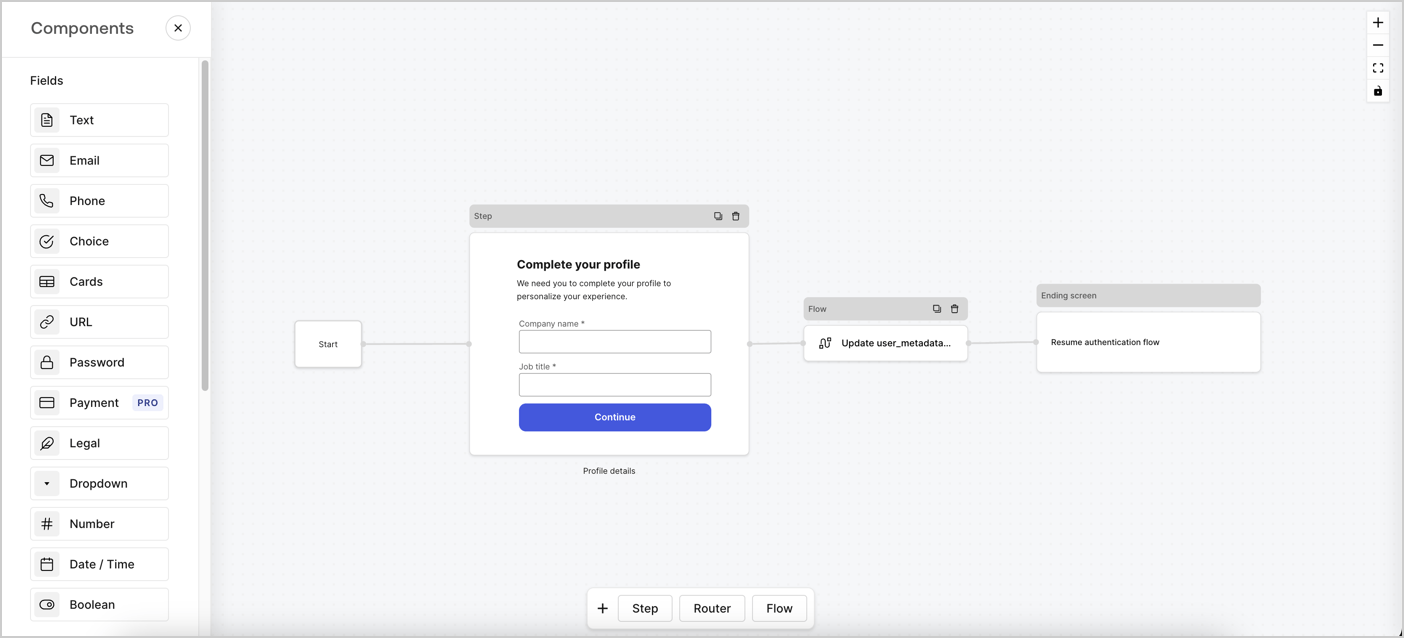
Forms for Actions allows you to create progressive profiling flows to decide when to prompt users to collect missing information, such as company name and job title, and store them as `user_metadata` attributes.
<Frame>
  <img src="https://mintcdn.com/docs-dev-feat-docs-5612-expanded-grant-support-ea/fO9QR70_Gdrw6w5B/docs/images/cdy7uua7fh8z/xUx9YmnHvnAqL19JvNtNP/60dae88f893d4ebe8e3523421e960596/Progressive-profle-overview.png?fit=max&auto=format&n=fO9QR70_Gdrw6w5B&q=85&s=1273bae05aa02831eeef75f185c09938" alt="Dashboard > Actions > Forms > Form" data-og-width="1404" width="1404" data-og-height="638" height="638" data-path="docs/images/cdy7uua7fh8z/xUx9YmnHvnAqL19JvNtNP/60dae88f893d4ebe8e3523421e960596/Progressive-profle-overview.png" data-optimize="true" data-opv="3" srcset="https://mintcdn.com/docs-dev-feat-docs-5612-expanded-grant-support-ea/fO9QR70_Gdrw6w5B/docs/images/cdy7uua7fh8z/xUx9YmnHvnAqL19JvNtNP/60dae88f893d4ebe8e3523421e960596/Progressive-profle-overview.png?w=280&fit=max&auto=format&n=fO9QR70_Gdrw6w5B&q=85&s=834c924c9d9f2f1cc4c8e85bf12ebc60 280w, https://mintcdn.com/docs-dev-feat-docs-5612-expanded-grant-support-ea/fO9QR70_Gdrw6w5B/docs/images/cdy7uua7fh8z/xUx9YmnHvnAqL19JvNtNP/60dae88f893d4ebe8e3523421e960596/Progressive-profle-overview.png?w=560&fit=max&auto=format&n=fO9QR70_Gdrw6w5B&q=85&s=f01e337322b3f1cca39f8b201f039353 560w, https://mintcdn.com/docs-dev-feat-docs-5612-expanded-grant-support-ea/fO9QR70_Gdrw6w5B/docs/images/cdy7uua7fh8z/xUx9YmnHvnAqL19JvNtNP/60dae88f893d4ebe8e3523421e960596/Progressive-profle-overview.png?w=840&fit=max&auto=format&n=fO9QR70_Gdrw6w5B&q=85&s=2b39ce8b21bb929d900c202ccf5640e2 840w, https://mintcdn.com/docs-dev-feat-docs-5612-expanded-grant-support-ea/fO9QR70_Gdrw6w5B/docs/images/cdy7uua7fh8z/xUx9YmnHvnAqL19JvNtNP/60dae88f893d4ebe8e3523421e960596/Progressive-profle-overview.png?w=1100&fit=max&auto=format&n=fO9QR70_Gdrw6w5B&q=85&s=456cdaacae17243b71582a34e42374a2 1100w, https://mintcdn.com/docs-dev-feat-docs-5612-expanded-grant-support-ea/fO9QR70_Gdrw6w5B/docs/images/cdy7uua7fh8z/xUx9YmnHvnAqL19JvNtNP/60dae88f893d4ebe8e3523421e960596/Progressive-profle-overview.png?w=1650&fit=max&auto=format&n=fO9QR70_Gdrw6w5B&q=85&s=eb4d25636e2b7e5d682e4225ae5bd7ab 1650w, https://mintcdn.com/docs-dev-feat-docs-5612-expanded-grant-support-ea/fO9QR70_Gdrw6w5B/docs/images/cdy7uua7fh8z/xUx9YmnHvnAqL19JvNtNP/60dae88f893d4ebe8e3523421e960596/Progressive-profle-overview.png?w=2500&fit=max&auto=format&n=fO9QR70_Gdrw6w5B&q=85&s=f113a4b8dd1375a71e01a5ceb183d4eb 2500w" />
</Frame>

The sections below outline how you can create a progressive profile form using nodes and flows, along with steps for adding your form to a [Post Login Action](/docs/customize/actions/explore-triggers/signup-and-login-triggers/login-trigger).

## Create a form from scratch

Follow these steps to create a form to gather information:

1. Open the Form editor by selecting **Auth0 Dashboard > Actions > Forms.**
2. Select **Create Form** > **Start from scratch**.

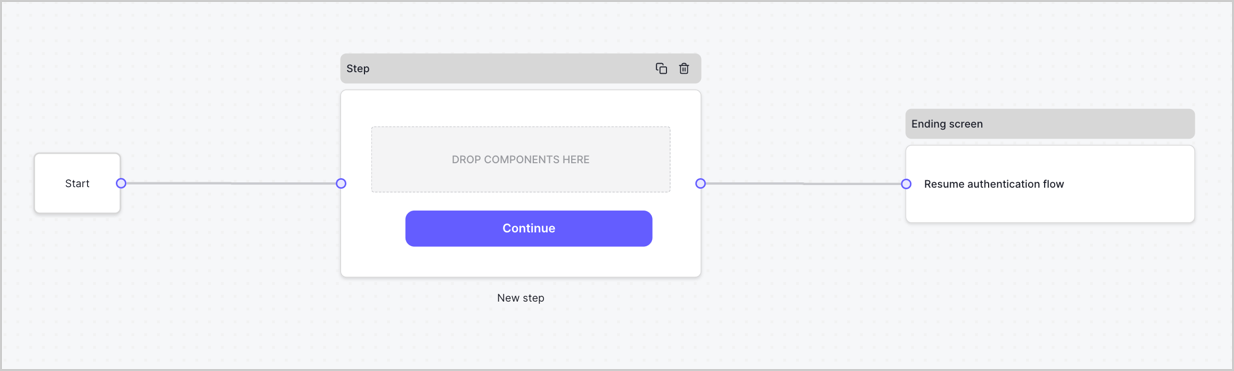
By default, a new form contains a Start node, a Step node, and an Ending screen node.
<Frame>
  <img src="https://mintcdn.com/docs-dev-feat-docs-5612-expanded-grant-support-ea/VOhouXEXS1syF493/docs/images/cdy7uua7fh8z/2TZ9jSjgEcARFpULI6hz4R/a4319a1bd482f2ee5cc23100fdb2f42c/New-form-Forms-for-action-use-case.png?fit=max&auto=format&n=VOhouXEXS1syF493&q=85&s=4385c6224b16ee4f88023082cf90ef73" alt="Dashboard > Forms > Use Cases > Form" data-og-width="1234" width="1234" data-og-height="371" height="371" data-path="docs/images/cdy7uua7fh8z/2TZ9jSjgEcARFpULI6hz4R/a4319a1bd482f2ee5cc23100fdb2f42c/New-form-Forms-for-action-use-case.png" data-optimize="true" data-opv="3" srcset="https://mintcdn.com/docs-dev-feat-docs-5612-expanded-grant-support-ea/VOhouXEXS1syF493/docs/images/cdy7uua7fh8z/2TZ9jSjgEcARFpULI6hz4R/a4319a1bd482f2ee5cc23100fdb2f42c/New-form-Forms-for-action-use-case.png?w=280&fit=max&auto=format&n=VOhouXEXS1syF493&q=85&s=8dea8ef45af4a0ae66e304ed153d8691 280w, https://mintcdn.com/docs-dev-feat-docs-5612-expanded-grant-support-ea/VOhouXEXS1syF493/docs/images/cdy7uua7fh8z/2TZ9jSjgEcARFpULI6hz4R/a4319a1bd482f2ee5cc23100fdb2f42c/New-form-Forms-for-action-use-case.png?w=560&fit=max&auto=format&n=VOhouXEXS1syF493&q=85&s=e18c110a245f9fda1d8b170278c12919 560w, https://mintcdn.com/docs-dev-feat-docs-5612-expanded-grant-support-ea/VOhouXEXS1syF493/docs/images/cdy7uua7fh8z/2TZ9jSjgEcARFpULI6hz4R/a4319a1bd482f2ee5cc23100fdb2f42c/New-form-Forms-for-action-use-case.png?w=840&fit=max&auto=format&n=VOhouXEXS1syF493&q=85&s=079ba2f222a4934e33f2d006e2bf5f46 840w, https://mintcdn.com/docs-dev-feat-docs-5612-expanded-grant-support-ea/VOhouXEXS1syF493/docs/images/cdy7uua7fh8z/2TZ9jSjgEcARFpULI6hz4R/a4319a1bd482f2ee5cc23100fdb2f42c/New-form-Forms-for-action-use-case.png?w=1100&fit=max&auto=format&n=VOhouXEXS1syF493&q=85&s=b6e9845c1fa738dedfa1865f95a53707 1100w, https://mintcdn.com/docs-dev-feat-docs-5612-expanded-grant-support-ea/VOhouXEXS1syF493/docs/images/cdy7uua7fh8z/2TZ9jSjgEcARFpULI6hz4R/a4319a1bd482f2ee5cc23100fdb2f42c/New-form-Forms-for-action-use-case.png?w=1650&fit=max&auto=format&n=VOhouXEXS1syF493&q=85&s=ea9d44878d85f825f942d8e65e1d1690 1650w, https://mintcdn.com/docs-dev-feat-docs-5612-expanded-grant-support-ea/VOhouXEXS1syF493/docs/images/cdy7uua7fh8z/2TZ9jSjgEcARFpULI6hz4R/a4319a1bd482f2ee5cc23100fdb2f42c/New-form-Forms-for-action-use-case.png?w=2500&fit=max&auto=format&n=VOhouXEXS1syF493&q=85&s=9c2b919645557fc6a90bd335c4ec004c 2500w" />
</Frame>

### Configure the Step node

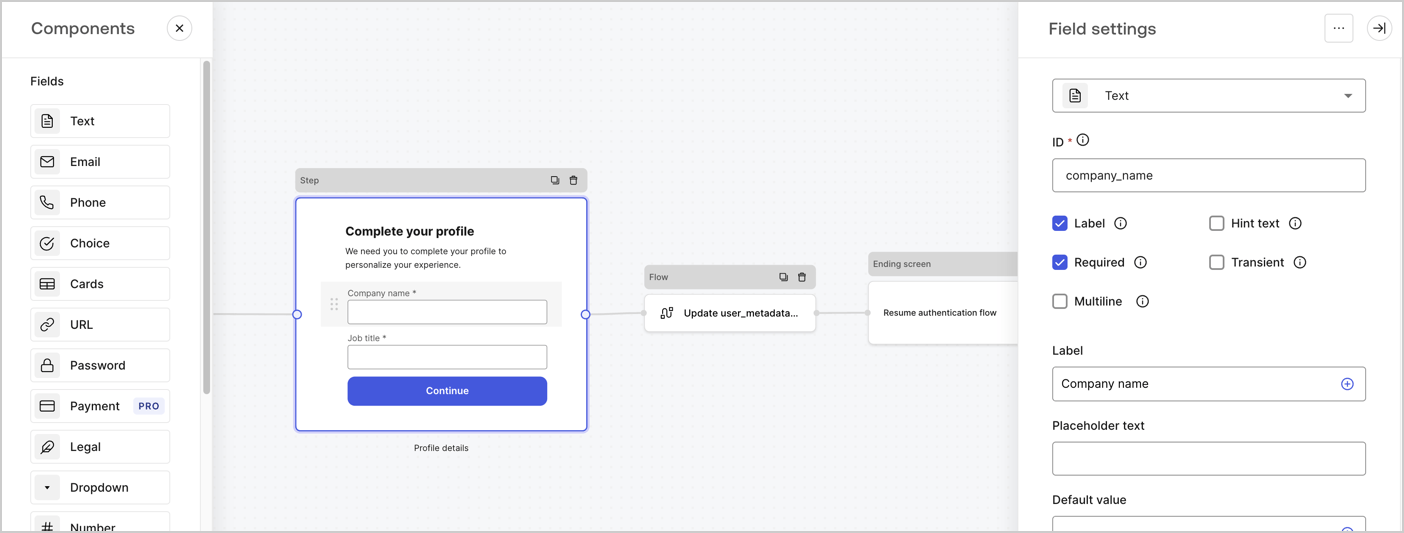
The Step node is the graphical interface visible to users. Add [Fields](/docs/customize/forms/nodes-and-components) to the Step node to collect the user's company name and job title values by following these steps:

1. Drag a **Rich text** field from the **Components menu** into the **Step** node.

   * **Rich text**: Enter a custom message.

     * **Example**: `Complete your profile! We need you to complete your profile to personalize your experience.`
   * Select **Save**.
2. Drag a **Text** field into the **Step** node.

   * **ID**: Enter `company_name`.
   * **Label**: Enable the checkbox.
   * **Label**: Enter `Company name`.
   * **Required**: Enable the checkbox.
   * Select **Save**.
3. Drag a **Text** field into the **Step** node.

   1. **ID**: Enter `job_title`.
   2. **Label**: Enter `Job title`.
   3. **Label**: Enable the checkbox.
   4. **Required**: Enable the checkbox.
   5. Select **Save**.
4. Select **Publish** to save.
<Frame>
  <img src="https://mintcdn.com/docs-dev-feat-docs-5612-expanded-grant-support-ea/eFsXEYm7m6Xq7yzA/docs/images/cdy7uua7fh8z/6H1lRzwKyYioQyQJ9MtIoM/aa248e92fc028a68a5b92ff361a11644/progressive-profile-step.png?fit=max&auto=format&n=eFsXEYm7m6Xq7yzA&q=85&s=20094e4dd966f24e5cae358c677eb233" alt="Dashboard > Actions > Forms > Form > Step node" data-og-width="1404" width="1404" data-og-height="533" height="533" data-path="docs/images/cdy7uua7fh8z/6H1lRzwKyYioQyQJ9MtIoM/aa248e92fc028a68a5b92ff361a11644/progressive-profile-step.png" data-optimize="true" data-opv="3" srcset="https://mintcdn.com/docs-dev-feat-docs-5612-expanded-grant-support-ea/eFsXEYm7m6Xq7yzA/docs/images/cdy7uua7fh8z/6H1lRzwKyYioQyQJ9MtIoM/aa248e92fc028a68a5b92ff361a11644/progressive-profile-step.png?w=280&fit=max&auto=format&n=eFsXEYm7m6Xq7yzA&q=85&s=1ed5fb1036992823b326b0170a8881e2 280w, https://mintcdn.com/docs-dev-feat-docs-5612-expanded-grant-support-ea/eFsXEYm7m6Xq7yzA/docs/images/cdy7uua7fh8z/6H1lRzwKyYioQyQJ9MtIoM/aa248e92fc028a68a5b92ff361a11644/progressive-profile-step.png?w=560&fit=max&auto=format&n=eFsXEYm7m6Xq7yzA&q=85&s=b5e7dacdafc180e76a203fd3f7403ca1 560w, https://mintcdn.com/docs-dev-feat-docs-5612-expanded-grant-support-ea/eFsXEYm7m6Xq7yzA/docs/images/cdy7uua7fh8z/6H1lRzwKyYioQyQJ9MtIoM/aa248e92fc028a68a5b92ff361a11644/progressive-profile-step.png?w=840&fit=max&auto=format&n=eFsXEYm7m6Xq7yzA&q=85&s=7f6ce2fc444442623abc979771ef6195 840w, https://mintcdn.com/docs-dev-feat-docs-5612-expanded-grant-support-ea/eFsXEYm7m6Xq7yzA/docs/images/cdy7uua7fh8z/6H1lRzwKyYioQyQJ9MtIoM/aa248e92fc028a68a5b92ff361a11644/progressive-profile-step.png?w=1100&fit=max&auto=format&n=eFsXEYm7m6Xq7yzA&q=85&s=8456e4475755b150486e9751d44f21c3 1100w, https://mintcdn.com/docs-dev-feat-docs-5612-expanded-grant-support-ea/eFsXEYm7m6Xq7yzA/docs/images/cdy7uua7fh8z/6H1lRzwKyYioQyQJ9MtIoM/aa248e92fc028a68a5b92ff361a11644/progressive-profile-step.png?w=1650&fit=max&auto=format&n=eFsXEYm7m6Xq7yzA&q=85&s=2af394f1624b558564069d7268dd4338 1650w, https://mintcdn.com/docs-dev-feat-docs-5612-expanded-grant-support-ea/eFsXEYm7m6Xq7yzA/docs/images/cdy7uua7fh8z/6H1lRzwKyYioQyQJ9MtIoM/aa248e92fc028a68a5b92ff361a11644/progressive-profile-step.png?w=2500&fit=max&auto=format&n=eFsXEYm7m6Xq7yzA&q=85&s=b384e73476055b17262736af0d3dbb36 2500w" />
</Frame>

### Configure the flow node

Add a **Flow** node after the **Step** node to update the `user_metadata` and resume the authentication flow by following these steps:

1. Select **Flow** from the bottom of the Form editor.
2. Remove the existing link between the **Step** and **Ending Screen** nodes.
3. Select the new **Flow** > **Click to add a flow** > **Create a new flow.**

   * Enter `Update user_metadata` in the **Name** field.
   * Select **Create**.
   * Select **Save**.
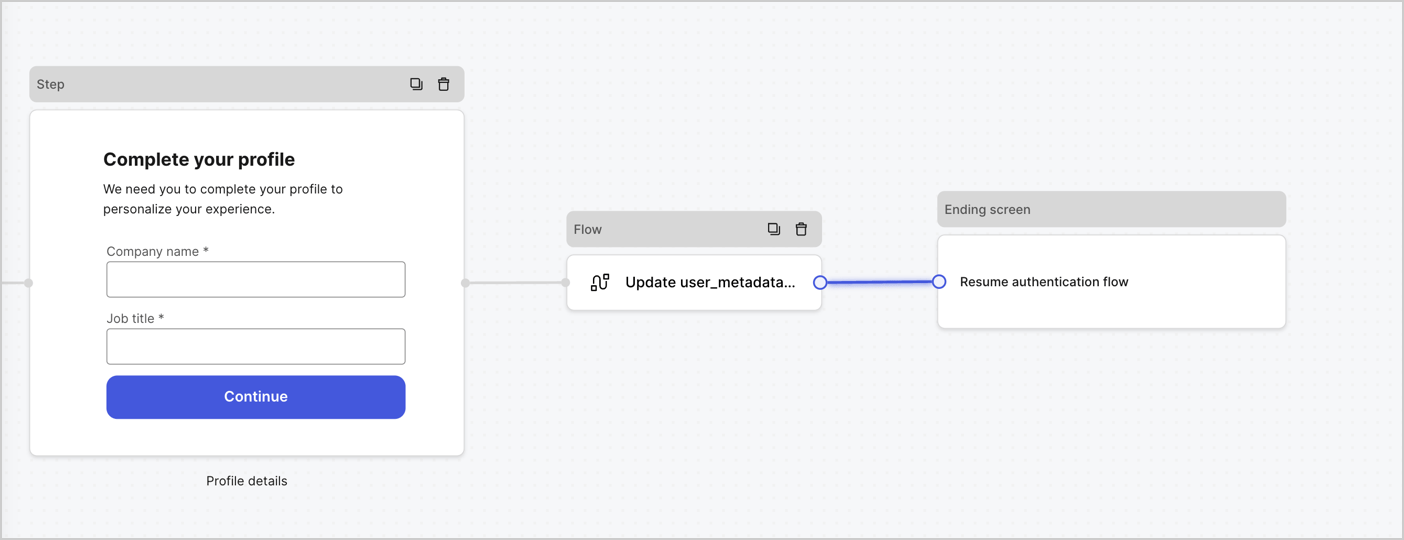
4. Link the **Flow** node to the **Step** and **Ending Screen** nodes as pictured below.
5. Select **Publish** to save.
<Frame>
  <img src="https://mintcdn.com/docs-dev-feat-docs-5612-expanded-grant-support-ea/unUdj8-aZq-Be-da/docs/images/cdy7uua7fh8z/5C91DaWn4LGtJT9BF87ssu/095171d0c452a287c44bfde12fd6d13f/link-nodes.png?fit=max&auto=format&n=unUdj8-aZq-Be-da&q=85&s=cdb5657682df77aaa3e2165b5fae99a7" alt="Dashboard > Actions > Forms > Form" data-og-width="1404" width="1404" data-og-height="540" height="540" data-path="docs/images/cdy7uua7fh8z/5C91DaWn4LGtJT9BF87ssu/095171d0c452a287c44bfde12fd6d13f/link-nodes.png" data-optimize="true" data-opv="3" srcset="https://mintcdn.com/docs-dev-feat-docs-5612-expanded-grant-support-ea/unUdj8-aZq-Be-da/docs/images/cdy7uua7fh8z/5C91DaWn4LGtJT9BF87ssu/095171d0c452a287c44bfde12fd6d13f/link-nodes.png?w=280&fit=max&auto=format&n=unUdj8-aZq-Be-da&q=85&s=082059d12bd5565f5a3ea05f51a79ce4 280w, https://mintcdn.com/docs-dev-feat-docs-5612-expanded-grant-support-ea/unUdj8-aZq-Be-da/docs/images/cdy7uua7fh8z/5C91DaWn4LGtJT9BF87ssu/095171d0c452a287c44bfde12fd6d13f/link-nodes.png?w=560&fit=max&auto=format&n=unUdj8-aZq-Be-da&q=85&s=1cab588d06c4ce6eb54482b39a706fe2 560w, https://mintcdn.com/docs-dev-feat-docs-5612-expanded-grant-support-ea/unUdj8-aZq-Be-da/docs/images/cdy7uua7fh8z/5C91DaWn4LGtJT9BF87ssu/095171d0c452a287c44bfde12fd6d13f/link-nodes.png?w=840&fit=max&auto=format&n=unUdj8-aZq-Be-da&q=85&s=c0c1cfc35e054c1058e12c8072689be1 840w, https://mintcdn.com/docs-dev-feat-docs-5612-expanded-grant-support-ea/unUdj8-aZq-Be-da/docs/images/cdy7uua7fh8z/5C91DaWn4LGtJT9BF87ssu/095171d0c452a287c44bfde12fd6d13f/link-nodes.png?w=1100&fit=max&auto=format&n=unUdj8-aZq-Be-da&q=85&s=a8307a4a7c8691cd86a7c1487d557913 1100w, https://mintcdn.com/docs-dev-feat-docs-5612-expanded-grant-support-ea/unUdj8-aZq-Be-da/docs/images/cdy7uua7fh8z/5C91DaWn4LGtJT9BF87ssu/095171d0c452a287c44bfde12fd6d13f/link-nodes.png?w=1650&fit=max&auto=format&n=unUdj8-aZq-Be-da&q=85&s=cced871d5f05dac42b80f1c8e0ad6ae3 1650w, https://mintcdn.com/docs-dev-feat-docs-5612-expanded-grant-support-ea/unUdj8-aZq-Be-da/docs/images/cdy7uua7fh8z/5C91DaWn4LGtJT9BF87ssu/095171d0c452a287c44bfde12fd6d13f/link-nodes.png?w=2500&fit=max&auto=format&n=unUdj8-aZq-Be-da&q=85&s=b5a26851edf33f86fc750254a8d1b604 2500w" />
</Frame>

Add an Auth0 Update user action to the flow by following these steps:

1. Select the **Update user\_metadata** flow, then select the **Edit Flow** to open the Flow editor in a new tab.
2. Below the **Start** action, select the **+** icon to add an **Update user** action. Complete the fields below, then select **Save** to continue.

   * **Connection**: Select from the dropdown the Vault connection to your M2M application.

   * **User ID**: Enter `{{context.user.user_id}}`.

   * **Body**: Copy and paste the following code to update the user\_metadata with `job_title` and `company_name` properties.

     ```json lines theme={null}
     {
        "user_metadata": {
           "job_title": "{{fields.job_title}}",
           "company_name": "{{fields.company_name}}"
        }
     }
     ```

   * Select **Save**.
3. Select **Publish** to save.

<Frame>
  <img src="https://mintcdn.com/docs-dev-feat-docs-5612-expanded-grant-support-ea/zKRtAyF9QzitOXOg/docs/images/cdy7uua7fh8z/65Jx4W5oIZJyyvA8z4HqIx/0661b1a8ca6361c54fc4fef07ba59f0b/update-user.png?fit=max&auto=format&n=zKRtAyF9QzitOXOg&q=85&s=3c01fb63b9a890e257235221480d2eb6" alt="Dashboard > Actions > Forms > Flows" data-og-width="1404" width="1404" data-og-height="244" height="244" data-path="docs/images/cdy7uua7fh8z/65Jx4W5oIZJyyvA8z4HqIx/0661b1a8ca6361c54fc4fef07ba59f0b/update-user.png" data-optimize="true" data-opv="3" srcset="https://mintcdn.com/docs-dev-feat-docs-5612-expanded-grant-support-ea/zKRtAyF9QzitOXOg/docs/images/cdy7uua7fh8z/65Jx4W5oIZJyyvA8z4HqIx/0661b1a8ca6361c54fc4fef07ba59f0b/update-user.png?w=280&fit=max&auto=format&n=zKRtAyF9QzitOXOg&q=85&s=6e75795b4830f2dd2129e4a2fe9b1e95 280w, https://mintcdn.com/docs-dev-feat-docs-5612-expanded-grant-support-ea/zKRtAyF9QzitOXOg/docs/images/cdy7uua7fh8z/65Jx4W5oIZJyyvA8z4HqIx/0661b1a8ca6361c54fc4fef07ba59f0b/update-user.png?w=560&fit=max&auto=format&n=zKRtAyF9QzitOXOg&q=85&s=ae062dd286abb18574df47a7b586656b 560w, https://mintcdn.com/docs-dev-feat-docs-5612-expanded-grant-support-ea/zKRtAyF9QzitOXOg/docs/images/cdy7uua7fh8z/65Jx4W5oIZJyyvA8z4HqIx/0661b1a8ca6361c54fc4fef07ba59f0b/update-user.png?w=840&fit=max&auto=format&n=zKRtAyF9QzitOXOg&q=85&s=606370705684af16a07c30be7a56eaa6 840w, https://mintcdn.com/docs-dev-feat-docs-5612-expanded-grant-support-ea/zKRtAyF9QzitOXOg/docs/images/cdy7uua7fh8z/65Jx4W5oIZJyyvA8z4HqIx/0661b1a8ca6361c54fc4fef07ba59f0b/update-user.png?w=1100&fit=max&auto=format&n=zKRtAyF9QzitOXOg&q=85&s=350d9eb8e9068697341bd5442c6f81a2 1100w, https://mintcdn.com/docs-dev-feat-docs-5612-expanded-grant-support-ea/zKRtAyF9QzitOXOg/docs/images/cdy7uua7fh8z/65Jx4W5oIZJyyvA8z4HqIx/0661b1a8ca6361c54fc4fef07ba59f0b/update-user.png?w=1650&fit=max&auto=format&n=zKRtAyF9QzitOXOg&q=85&s=f7ae9ead3687a69cd979975c811ade34 1650w, https://mintcdn.com/docs-dev-feat-docs-5612-expanded-grant-support-ea/zKRtAyF9QzitOXOg/docs/images/cdy7uua7fh8z/65Jx4W5oIZJyyvA8z4HqIx/0661b1a8ca6361c54fc4fef07ba59f0b/update-user.png?w=2500&fit=max&auto=format&n=zKRtAyF9QzitOXOg&q=85&s=905031aa74855ce1c9205818fb2e10bc 2500w" />
</Frame>

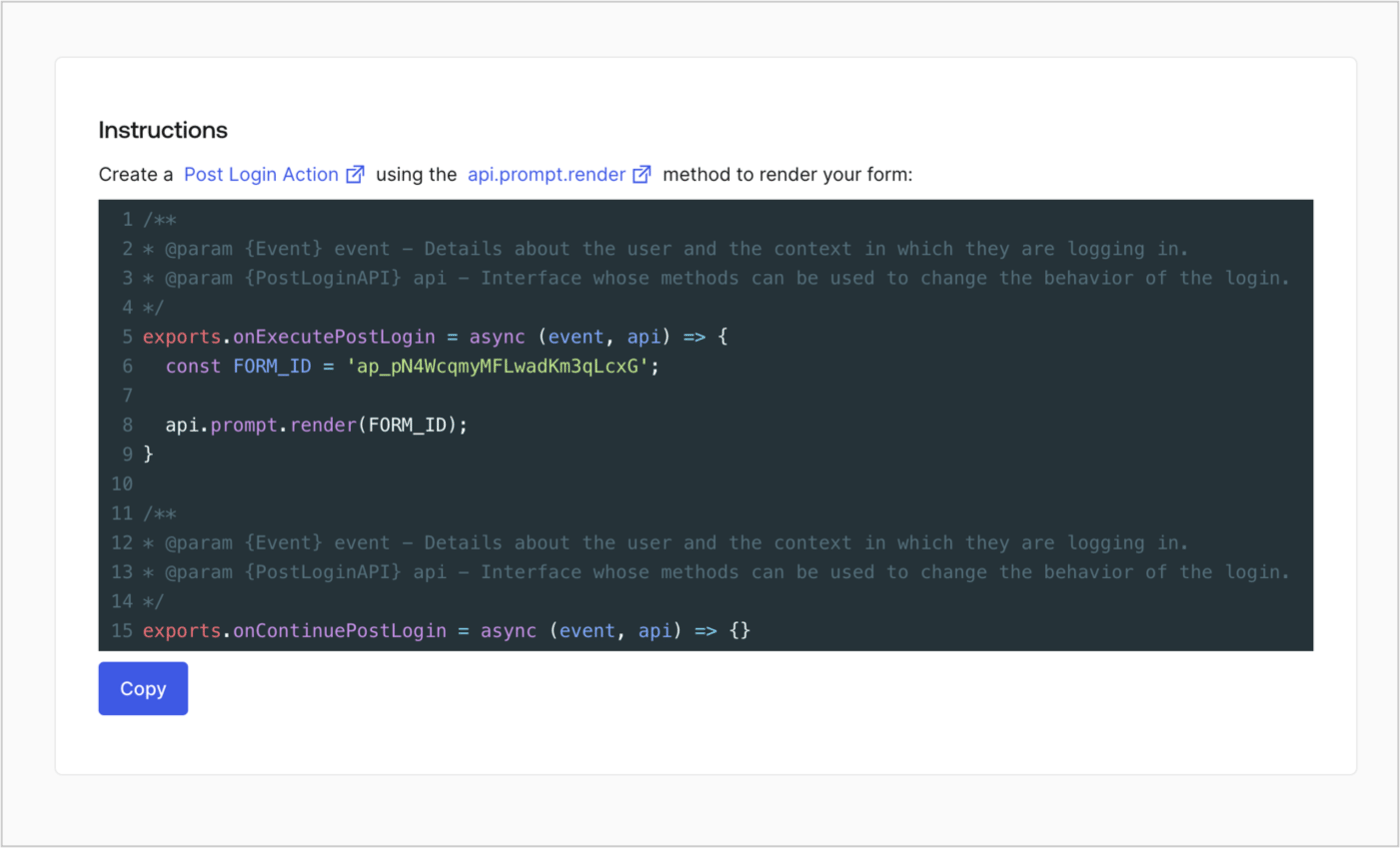
### Retrieve the form render code

Retrieve the form render code to visually render the form with a custom Post Login Action by following these steps:

* From the Form editor, select **`<> Render`**.
* Select **Copy**.
<Frame>
  <img src="https://mintcdn.com/docs-dev-feat-docs-5612-expanded-grant-support-ea/E7UrUEe-dEh_F8Pm/docs/images/cdy7uua7fh8z/2EIUzc539sq9lwoTKbjoJv/496a864c0fc44a782c9cadca119dbfb0/embed.png?fit=max&auto=format&n=E7UrUEe-dEh_F8Pm&q=85&s=a7b3b4b43e7a86fe464782403d4dee63" alt="Dashboard > Actions > Forms > Form > Embed" data-og-width="1400" width="1400" data-og-height="848" height="848" data-path="docs/images/cdy7uua7fh8z/2EIUzc539sq9lwoTKbjoJv/496a864c0fc44a782c9cadca119dbfb0/embed.png" data-optimize="true" data-opv="3" srcset="https://mintcdn.com/docs-dev-feat-docs-5612-expanded-grant-support-ea/E7UrUEe-dEh_F8Pm/docs/images/cdy7uua7fh8z/2EIUzc539sq9lwoTKbjoJv/496a864c0fc44a782c9cadca119dbfb0/embed.png?w=280&fit=max&auto=format&n=E7UrUEe-dEh_F8Pm&q=85&s=528ed446e9de6499d06372393fd0c7b7 280w, https://mintcdn.com/docs-dev-feat-docs-5612-expanded-grant-support-ea/E7UrUEe-dEh_F8Pm/docs/images/cdy7uua7fh8z/2EIUzc539sq9lwoTKbjoJv/496a864c0fc44a782c9cadca119dbfb0/embed.png?w=560&fit=max&auto=format&n=E7UrUEe-dEh_F8Pm&q=85&s=86d51125dc550acf1bbdd9e8b4bb3469 560w, https://mintcdn.com/docs-dev-feat-docs-5612-expanded-grant-support-ea/E7UrUEe-dEh_F8Pm/docs/images/cdy7uua7fh8z/2EIUzc539sq9lwoTKbjoJv/496a864c0fc44a782c9cadca119dbfb0/embed.png?w=840&fit=max&auto=format&n=E7UrUEe-dEh_F8Pm&q=85&s=5bf307a3e9dfdad9ccba2bb4c0c12714 840w, https://mintcdn.com/docs-dev-feat-docs-5612-expanded-grant-support-ea/E7UrUEe-dEh_F8Pm/docs/images/cdy7uua7fh8z/2EIUzc539sq9lwoTKbjoJv/496a864c0fc44a782c9cadca119dbfb0/embed.png?w=1100&fit=max&auto=format&n=E7UrUEe-dEh_F8Pm&q=85&s=9dbe1e80880bb3c0749ee2a41f4deb43 1100w, https://mintcdn.com/docs-dev-feat-docs-5612-expanded-grant-support-ea/E7UrUEe-dEh_F8Pm/docs/images/cdy7uua7fh8z/2EIUzc539sq9lwoTKbjoJv/496a864c0fc44a782c9cadca119dbfb0/embed.png?w=1650&fit=max&auto=format&n=E7UrUEe-dEh_F8Pm&q=85&s=092b748a15d6dee8c241f713c0371364 1650w, https://mintcdn.com/docs-dev-feat-docs-5612-expanded-grant-support-ea/E7UrUEe-dEh_F8Pm/docs/images/cdy7uua7fh8z/2EIUzc539sq9lwoTKbjoJv/496a864c0fc44a782c9cadca119dbfb0/embed.png?w=2500&fit=max&auto=format&n=E7UrUEe-dEh_F8Pm&q=85&s=dfc11e4bfb0d69fe8b85dc1dd8f86ce5 2500w" />
</Frame>

## Create a Post Login Action

Create a post-login Action to render your form by following these steps:

1. Navigate to **Auth0 Dashboard > Actions > Flows > Login.**
2. Select the **+** icon and select **Build from scratch**:

   * **Name**: Enter `Render Progressive Profile Form`.
   * **Trigger**: Select `Login / Post Login`.
   * **Runtime**: Select the recommended version.
3. Select **Create**.

To configure the post-login Action:

1. Delete the existing code from the Code editor.
2. Paste the form embed code into the Code editor.
3. Edit the code to define the conditional logic that will render the form.

   ```javascript lines theme={null}
   /**
   * @param {Event} event - Details about the user and the context in which they are logging in.
   * @param {PostLoginAPI} api - Interface whose methods can be used to change the behavior of the login.
   */
   exports.onExecutePostLogin = async (event, api) => {
     const FORM_ID = 'REPLACE_WITH_YOUR_FORM_ID';

     if (
       event.stats.logins_count > 2 &&
       !event.user.user_metadata.company_name &&
       !event.user.user_metadata.job_title
     ) {
       api.prompt.render(FORM_ID);
     }
   }

   exports.onContinuePostLogin = async (event, api) => { }
   ```

   <Callout icon="file-lines" color="#0EA5E9" iconType="regular">
     The example code above will render the form when a user has a login count > 2 and is missing the user metadata company\_name and job\_title properties.
   </Callout>
4. Select **Deploy.**
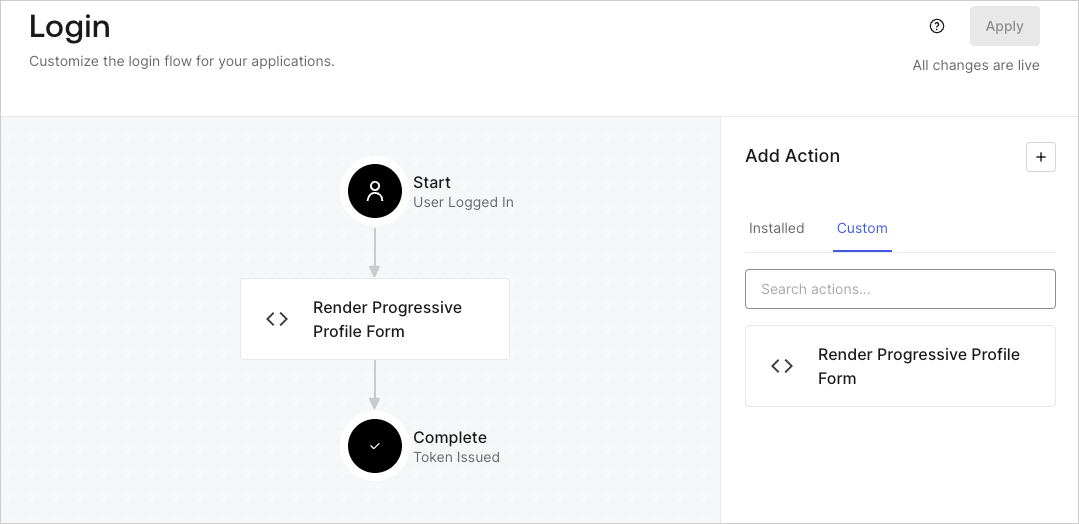
5. Drag and Drop the **Render Progressive Profile Form** Action to the **Login** flow.
   <Frame>
     <img src="https://mintcdn.com/docs-dev-feat-docs-5612-expanded-grant-support-ea/Phf2sVfMJlAEXT_c/docs/images/cdy7uua7fh8z/1QjjZdpTqTxx012UDN4xk9/99fba5ef4068a5688f1762eea7f42976/renderprogessiveprofile.png?fit=max&auto=format&n=Phf2sVfMJlAEXT_c&q=85&s=cfdf2d3d67795fb1b22a97c4960397e9" alt="Dashboard > Forms > Use Cases Progressive Profile Login Action" data-og-width="1079" width="1079" data-og-height="524" height="524" data-path="docs/images/cdy7uua7fh8z/1QjjZdpTqTxx012UDN4xk9/99fba5ef4068a5688f1762eea7f42976/renderprogessiveprofile.png" data-optimize="true" data-opv="3" srcset="https://mintcdn.com/docs-dev-feat-docs-5612-expanded-grant-support-ea/Phf2sVfMJlAEXT_c/docs/images/cdy7uua7fh8z/1QjjZdpTqTxx012UDN4xk9/99fba5ef4068a5688f1762eea7f42976/renderprogessiveprofile.png?w=280&fit=max&auto=format&n=Phf2sVfMJlAEXT_c&q=85&s=ef7e345e8bc0a4cb7d0fb4adf64a35dd 280w, https://mintcdn.com/docs-dev-feat-docs-5612-expanded-grant-support-ea/Phf2sVfMJlAEXT_c/docs/images/cdy7uua7fh8z/1QjjZdpTqTxx012UDN4xk9/99fba5ef4068a5688f1762eea7f42976/renderprogessiveprofile.png?w=560&fit=max&auto=format&n=Phf2sVfMJlAEXT_c&q=85&s=603626cf48958972ed0237982438a310 560w, https://mintcdn.com/docs-dev-feat-docs-5612-expanded-grant-support-ea/Phf2sVfMJlAEXT_c/docs/images/cdy7uua7fh8z/1QjjZdpTqTxx012UDN4xk9/99fba5ef4068a5688f1762eea7f42976/renderprogessiveprofile.png?w=840&fit=max&auto=format&n=Phf2sVfMJlAEXT_c&q=85&s=c64757e1608df58d644ef2ac4a53b98c 840w, https://mintcdn.com/docs-dev-feat-docs-5612-expanded-grant-support-ea/Phf2sVfMJlAEXT_c/docs/images/cdy7uua7fh8z/1QjjZdpTqTxx012UDN4xk9/99fba5ef4068a5688f1762eea7f42976/renderprogessiveprofile.png?w=1100&fit=max&auto=format&n=Phf2sVfMJlAEXT_c&q=85&s=abf684dd77f81701e53ed878752bc0c5 1100w, https://mintcdn.com/docs-dev-feat-docs-5612-expanded-grant-support-ea/Phf2sVfMJlAEXT_c/docs/images/cdy7uua7fh8z/1QjjZdpTqTxx012UDN4xk9/99fba5ef4068a5688f1762eea7f42976/renderprogessiveprofile.png?w=1650&fit=max&auto=format&n=Phf2sVfMJlAEXT_c&q=85&s=6c977f73b66f37155f22970b032856f2 1650w, https://mintcdn.com/docs-dev-feat-docs-5612-expanded-grant-support-ea/Phf2sVfMJlAEXT_c/docs/images/cdy7uua7fh8z/1QjjZdpTqTxx012UDN4xk9/99fba5ef4068a5688f1762eea7f42976/renderprogessiveprofile.png?w=2500&fit=max&auto=format&n=Phf2sVfMJlAEXT_c&q=85&s=66e15af391b022176cd4636576fe17f6 2500w" />
   </Frame>
6. Select **Apply**.

### Test implementation

Test the implementation by following these steps:

1. Log in with an existing user whose login count is greater than 2 and their `user_metadata` attributes `company_name` and `job_title` have no values.
2. The post-login action in the Login flow will render the form and prompt for the information.
3. Select **Auth0 Dashboard > User Management > Users,** locate the user and verify that the `user_metadata` attributes `company_name` and `job_title` contain information.
